
Bevel Intelligence Common Questions
We’ve compiled answers to the most frequently asked questions about Bevel Intelligence.
How can I report an incorrect or unhelpful response?
If Bevel Intelligence gives an incorrect, incomplete, or unhelpful response, the best way to help us improve is by using the thumbs down button on the message.
When you thumbs down a response:
Our team can review the issue directly
We can identify patterns and improve future responses
Your feedback helps us fix bugs and improve accuracy faster
Thumbs down feedback is the most effective way to report issues and help us improve the product. Whenever something seems off, we encourage you to use it.
What is the difference between the old Bevel Intelligence and the new Bevel Intelligence?
A lot has changed. Read the rest of the Bevel Intelligence section for a full overview.
The new Bevel Intelligence introduces a more powerful and flexible experience. You can now upload and analyze health records, including blood biomarkers, create and manage files like charts and visualizations, adjust AI personalities, build fitness and nutrition plans, log habits, and receive daily summaries and check-ins, among other features.
Memories are no longer stored in a dedicated section and are instead organized within Files.
You may also notice less visible feedback when actions are taken. For example, you won’t see confirmation “bubbles” when something is created or updated. To view these actions, open the dropdown in the chat where Bevel Intelligence outlines what it’s doing in the background.
How do I move my conversations from Claude/ChatGPT/etc. to Bevel Intelligence?
You can easily bring context from ChatGPT, Claude, Gemini, and other AI assistants into Bevel Intelligence so it better understands your preferences, goals, and past conversations.
How it works
Open your current AI assistant (ChatGPT, Claude, Gemini, etc.)
Ask it to export your memories/context using a prompt like:
“I’m migrating my health data and coaching context into Bevel Intelligence so it can better understand how I function day to day and make more personalized recommendations.
Please generate a comprehensive export of every health-related detail you’ve learned about me across our conversations.
The goal is to help Bevel understand my:
• recovery patterns
• sleep habits
• fitness routines
• nutrition behaviors
• stress trends
• biomarkers and lab context
• health history
• daily habits
• lifestyle factors
• coaching preferences
Only include information that would be useful for a health, longevity, recovery, or performance platform. Leave out unrelated topics unless they directly impact my wellbeing, routine, recovery, or energy levels.
Please include:
• saved memories
• long-term patterns you’ve observed
• recurring preferences
• inferred context from repeated conversations
Return everything inside one large code block with separate entries instead of summaries.
Areas to include:
• sleep quality, schedule, bedtime/wake trends, naps, sleep issues, sleep goals
• recovery habits, HRV-related discussions, fatigue patterns, overtraining concerns, rest day preferences
• workouts, exercise frequency, strength training, cardio, running, cycling, sports, mobility, stretching, rehab, conditioning
• nutrition habits, calorie targets, macro preferences, meal timing, foods I regularly eat or avoid, hydration habits
• supplements, medications, caffeine intake, alcohol habits, glucose-related context, or reactions to substances
• biomarkers, bloodwork, health records, lab testing, hormone discussions, metabolic markers, body composition metrics
• stress levels, burnout patterns, energy fluctuations, nervous system or mental recovery discussions
• wearable devices and health platforms I use (Apple Watch, Oura, Garmin, CGMs, etc.)
• health tracking habits, journaling behaviors, routine tracking, adherence patterns, consistency challenges
• injuries, chronic issues, surgeries, pain points, physical limitations, or movement restrictions
• schedule constraints, travel patterns, work/life habits that affect recovery or training
• communication preferences for coaching, accountability, planning, reminders, or feedback
• corrections or feedback I’ve previously given you about recommendations or health plans
• any context related to longevity, optimization, preventative health, or overall wellness
If dates exist for specific memories, include them. Do not shorten, condense, or combine entries together. I want the raw export in full detail. Include all relevant context available to you, even if it seems minor or repetitive."
Copy the generated response.
Open Bevel Intelligence and begin your message with “Save this to Files as context,” then paste the exported response below it.
How to Create Cardio Workout Templates
You can create custom cardio workout templates using Bevel Intelligence.
Open Bevel Intelligence.
Ask Bevel Intelligence to create a cardio workout. For example:
"Create a 30-minute interval running workout."
"Build a cycling workout with a 10-minute warm-up and 5 x 2-minute intervals."
Tap the workout card to review the generated workout.
Tap Start on Apple Watch to begin immediately, or Schedule for Later to save it for a future date.
If you tapped Start on Apple Watch, or when it's time for a scheduled workout, open the Workout app on your Apple Watch.
Scroll to the top of the workout list to find your custom workout and start it.
You can create templates for a variety of cardio activities, including running, cycling, rowing, and more. Set goals such as time, distance, pace, heart rate, or calories, and build custom interval workouts to match your training.
How to Change Thinking Modes
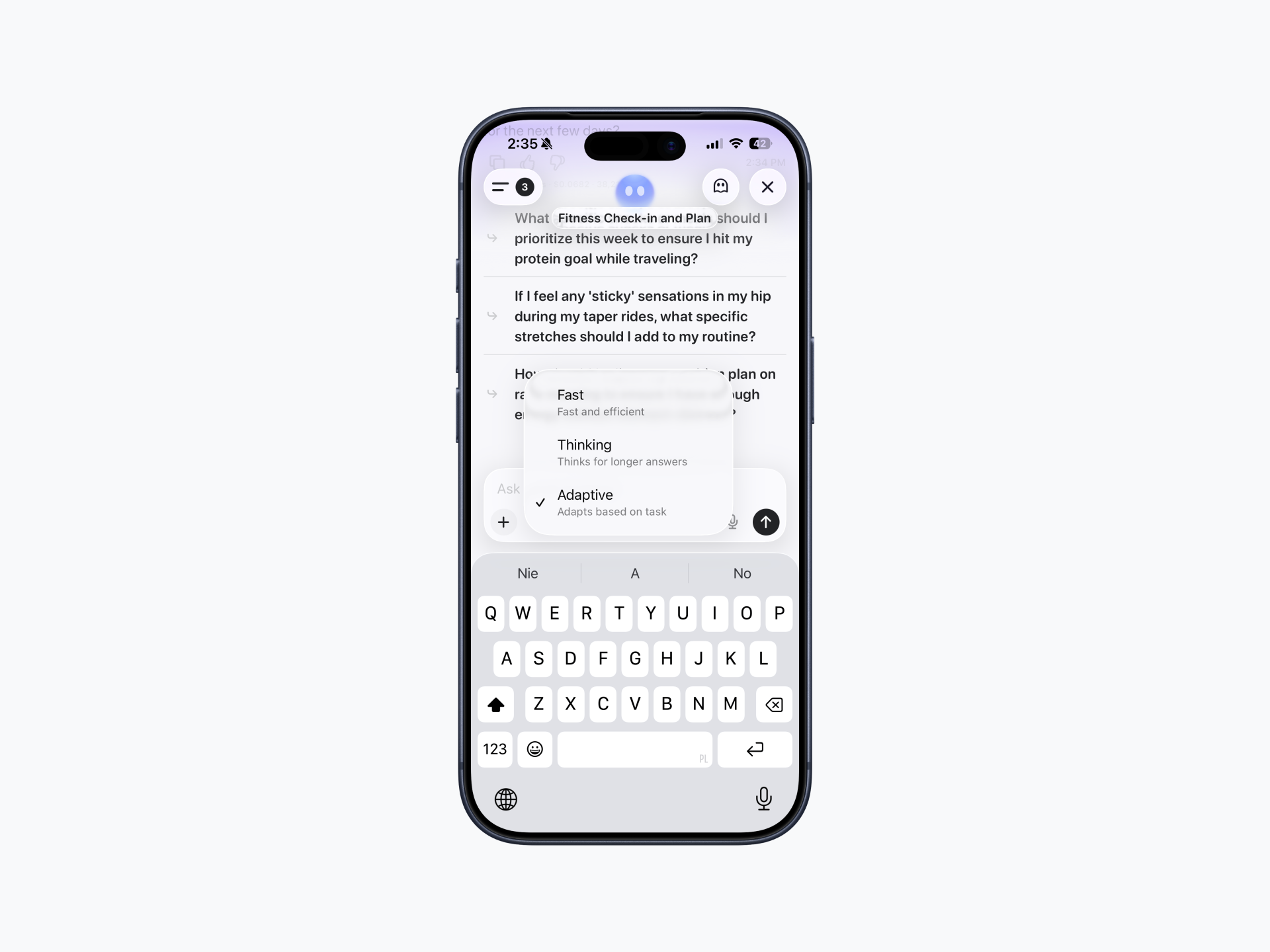
Thinking Modes let you choose how quickly or deeply Bevel Intelligence responds to your requests.
Change Your Thinking Mode
Open Bevel Intelligence.
Tap Fast, Thinking, or Adaptive below the message text box, just above the keyboard.
Select your preferred mode:
Fast for quicker responses.
Thinking for more in-depth reasoning.
Adaptive to automatically choose the appropriate level of reasoning based on your request.
Your selected mode will be used for future Bevel Intelligence chats until you change it again.
How to Filter Your Bevel Intelligence Chats
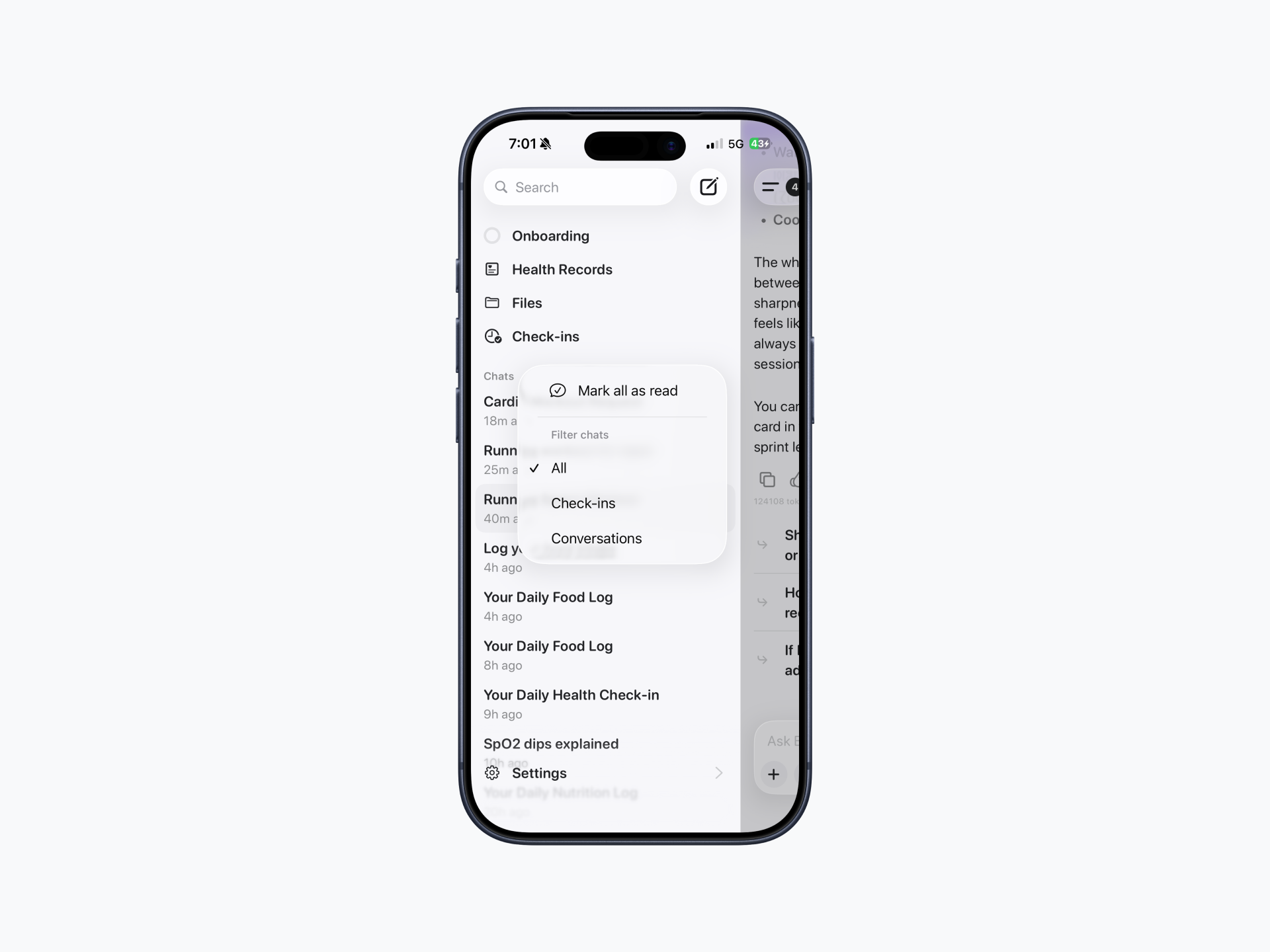
You can filter your Bevel Intelligence chats to quickly find conversations or daily check-ins.
Open Bevel Intelligence.
Tap the menu icon in the top-left corner.
Tap the three dots next to Chats.
Select one of the following filters:
All to view all chats.
Check-ins to view only daily check-ins.
Conversations to view only conversations.
Where can I view my schedule or plan created by Bevel Intelligence?
Schedules and plans are currently only available in the Files section of Bevel Intelligence. They are not displayed on the Home page.
Why isn't Bevel seeing my subscribed calendar or iCloud Family calendar?
Bevel can only access calendars that are enabled in your connected calendar settings.
If you use Google Calendar, you can add your subscribed calendar to your Google Calendar account on the desktop website.
The same applies to shared calendars, such as an iCloud Family calendar. If the calendar appears in your connected account and is enabled in Bevel's calendar settings, its events will be available to Bevel. If it doesn't appear, it isn't currently available through the connected calendar integration.
What is Model Selection?
Model Selection lets you choose which AI model Bevel Intelligence uses.
Standard provides a balanced experience for everyday use.
Upgraded uses a more advanced model that is generally more intelligent, more capable, and faster than the Standard model.
Because the Upgraded model requires more computing resources, it uses more of your weekly Bevel Intelligence allowance.
What are Beta Features?
Enabling Beta Features gives you access to the latest experimental improvements we're testing before they're released to everyone. These features may include improvements to:
Accuracy
Instruction following
Memory
Other Bevel Intelligence capabilities
Since these features are still being tested, you may occasionally experience unexpected behavior or reduced performance. Once we've confirmed they are stable, they will be rolled out to all users.