
How to Use the Sleep Shortcut
The Sleep Shortcut makes it easy to start your Sleep routine and accurately track your Sleep metrics using your Apple Watch.
Quickly enables Sleep Focus and Sleep Alarm.
Ensures your Sleep tracking begins accurately.
Sleep Alarm
The Sleep Alarm Shortcut activates the Sleep Alarm on your Apple Watch, allowing you to start it with a tap on your iPhone or set up automation to start it automatically.
Sleep Focus
Sleep Focus silences notifications so you can Sleep without interruptions and dims your screen to create a calm environment.
How to Turn on the Sleep Shortcut
Open Bevel.
Tap your initials or profile picture in the top-right corner.
Tap Shortcuts.
Under Sleep Alarm + Sleep Focus Tap Add to Shortcuts.
You will be prompted to a screen outside of Bevel. Tap Add Shortcut.
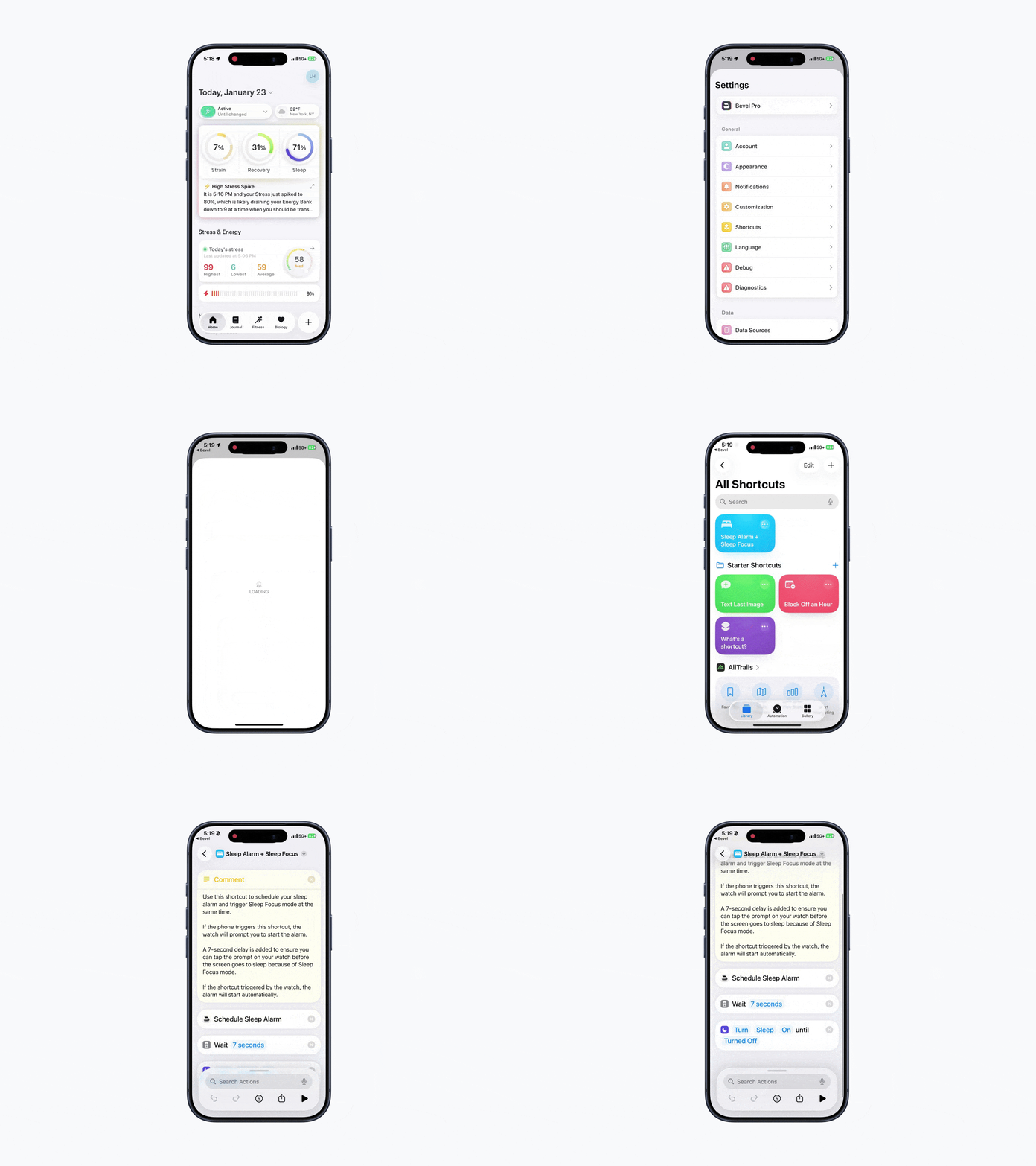
Note: Our favorite way to use this feature is to add it to your home screen, lock screen, or control center as a widget, or add it to your watch as a complication. Before bed, simply tap the widget or complication to turn on the Sleep Shortcut. The Sleep Shortcut activates when it is triggered, and the Alarm it uses will be the most recently set Alarm.