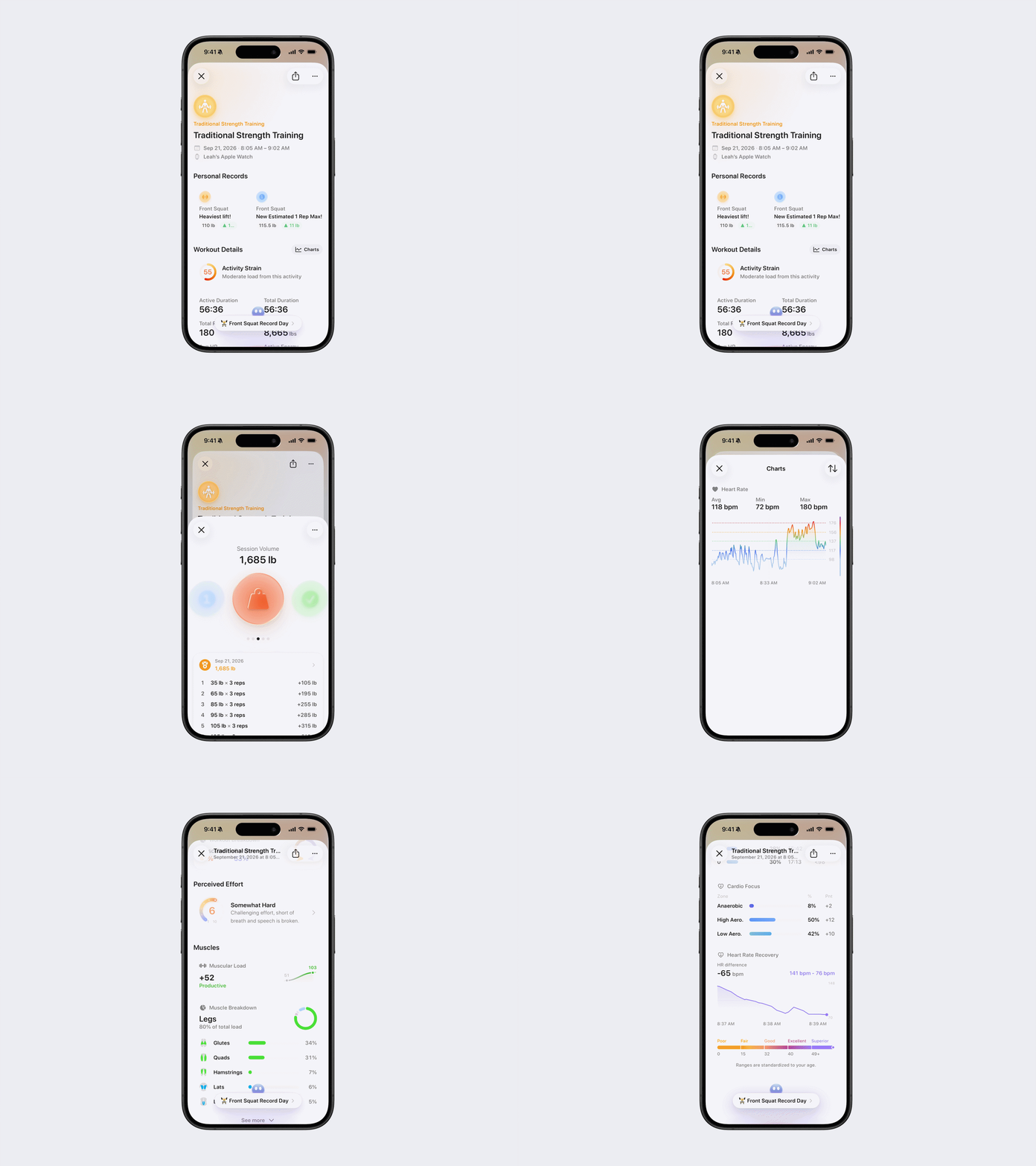
Understanding Strength Activity Details
Strength Activity Details provides a breakdown of a recorded strength workout. The information shown depends on whether the workout was recorded using Bevel Strength Builder or imported from an external source.
View Strength Activity Details
Option 1: Via Timeline
Open Bevel.
Scroll down to Timeline.
Tap View Timeline.
Tap the strength activity you want to view.
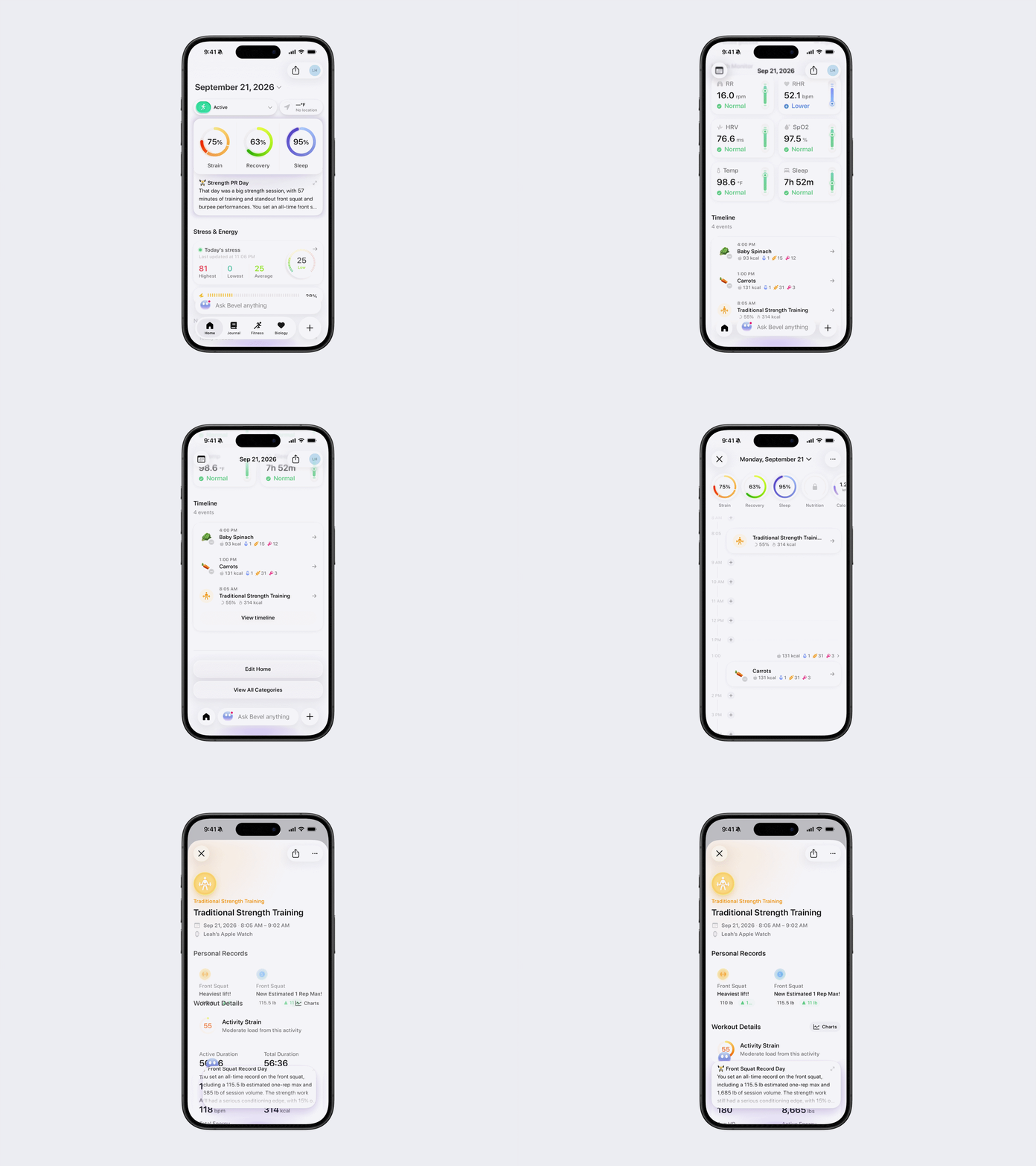
Option 2: Via the Fitness Tab
Open Bevel.
Go to the Fitness Tab.
Scroll down to Today’s Activity.
Tap the strength activity you want to view.

Activity Summary
At the top of Activity Details, you’ll see:
Activity title
Date and time
Device used to record the activity
Activity Options
Tap the three dots (...) in the top-right corner to access the available activity options:
Sync to Strava
Unlink Activity, if the workout is linked to another activity
Save as New Routine
Edit Log Details
Edit Strength Activity Details
To edit a strength activity:
Tap the three dots (...) in the top-right corner.
Tap Edit Log Details.
Update any available details, including:
Title
Date
Duration
Active Energy
Distance
Elevation
Perceived Effort
Reflection
Exercises
Tap the checkmark in the top-right corner to save your changes.
Available fields depend on the workout and recorded data.
Add Exercises
From Edit Log Details, tap Add Exercise. You can add exercises by:
Copying a Workout Routine
Searching for an exercise
Capturing a photo
Importing a photo
Describing a routine
If you edit a saved Routine that is currently in your schedule, you’ll be asked where you want to apply your edits:
This activity only: Applies your changes only to the activity you’re currently editing. Future scheduled activities will remain unchanged.
This and upcoming activities: Applies your changes to the current activity and all upcoming scheduled activities using this Routine.
Cancel: Returns without applying the changes.
Strength Activity Details by Source
Strength Workouts Recorded with Bevel
A workout recorded using Bevel Strength Builder may include:
Workout Details
Charts
Activity Strain
All Metrics
Workout Breakdown
Perceived Effort
Muscular Load
Muscle Breakdown
Exercises: sets, repetitions, and weights
Cardio Load
Heart Rate
Heart Rate Zones
Cardio Focus
Strength Workouts from an External Source
A strength workout imported from an external source may include:
Workout Details
Charts
Activity Strain
Metrics
Exercises
Cardio Load
Heart Rate
Heart Rate Zones
Cardio Focus
Heart Rate Recovery
If an external activity does not include exercise details, tap Add Exercise to add them.
Workout Details
For workouts recorded using Bevel Strength Builder, Workout Details may include:
Active Duration
Total Duration
Total Reps
Total Weight
Avg HR
Active Energy
Total Energy
Tap All Metrics to view the complete list of available workout data.
For externally recorded workouts, the available metrics depend on the information provided by the recording device or app.
Customize Strength Activity Charts
Under Workout Details, tap Charts to view and customize the charts available for the workout.
To reorder your charts:
Tap the reorder icon in the top-right corner.
Press and hold a chart, then drag it to your desired position.
Tap the checkmark in the top-right corner to save.
Tap the X in the top-left corner to exit.
Available charts depend on the workout source and recorded data.
Personal Records
Any Personal Records you set during this activity will appear here.
Workout Breakdown
For workouts recorded using Bevel Strength Builder, Workout Breakdown shows how the activity’s overall Strain is divided between cardiovascular and muscular effort.
A strength workout may produce high Muscular Strain even when your heart rate remains relatively low.
Activity Strain
Activity Strain shows how much the workout contributed to your total daily Strain:
0: No added Strain
1–20: Little physical demand
21–40: Slightly increased your daily Strain
41–60: Added noticeable Strain
61–80: Made up a major part of today’s Strain
80+: Added a very high load from this activity
Perceived Effort
For workouts recorded using Bevel Strength Builder, Perceived Effort reflects how difficult the workout felt:
1: Minimal Effort
2: Very Light
3: Light
4: Moderate
5: Tiring
6: Somewhat Hard
7: Hard
8: Very Hard
9: Extremely Hard
10: Maximum Effort
You can update Perceived Effort through Edit Log Details.
Muscles
For workouts recorded using Bevel Strength Builder, the Muscles section may include:
Muscular Load: The training load placed on your muscles during the workout
Muscle Breakdown: The muscle groups used during the workout
Tap See More under Muscle Breakdown to view all the muscle groups used.
Exercises
The Exercises section displays the exercises associated with the workout.
For workouts recorded using Bevel Strength Builder, exercise details may include:
Sets
Repetitions
Weight
Duration
Set type
Perceived effort
For a workout imported from an external source, tap Add Exercise to add missing exercise details.
Heart
Strength Workouts Recorded with Bevel
The Heart section may include:
Cardio Load: The workout’s contribution to your cardiovascular training load
Heart Rate: Your average, minimum, and maximum heart rate, along with a chart
Heart Rate Zones: The percentage of the workout and heart rate range spent in each zone
Cardio Focus: Your percentage and Cardio Points across Low Aerobic, High Aerobic, and Anaerobic training
Strength Workouts from an External Source
The Heart section may include:
Cardio Load
Heart Rate
Heart Rate Zones
Cardio Focus
Heart Rate Recovery: The difference between your peak exercise heart rate and your heart rate during recovery