
Journal Common Questions
We’ve compiled answers to the most frequently asked questions about Journal.
What is Journal?
Journal is designed to help you track your daily habits and better understand how those behaviors impact your health metrics over time.
For example, if you’re unsure whether something like a weighted blanket, caffeine timing, or late meals are helping or hurting your sleep, Journal allows you to quantify those effects using your Bevel data.
What are the best practices for using Journal?
To get the most accurate and useful insights:
Log entries throughout the day as events happen
Stay consistent: gaps in logging can reduce insight quality
Be mindful that Journal works best when paired with your real daily habits, not occasional entries
How is a “Day” defined?
A Journal “day” runs from when you wake up → until your next wake time
Nighttime entries include everything that happens before sleep and overnight until you wake up again
Why does 10k+ steps lower my Recovery score?
This reflects a correlation, not a cause-and-effect relationship. Higher step counts may coincide with other factors like fatigue, travel, or increased activity levels that impact recovery.
What is “Morning Sunlight”?
"Morning Sunlight (auto)” uses Apple Health’s Time in Daylight data together with your recorded wake-up time.
Data source: Apple Watch estimates time in daylight using its ambient light sensor and saves it to Apple Health. Bevel reads that data; it doesn’t perform its own GPS or geolocation check for this factor. Apple’s explanation.
What counts as “morning”: The first hour after your main sleep session ends, rather than a fixed clock-time window. For example, if your recorded wake-up time is 7:30 a.m., Bevel checks 7:30–8:30 a.m.
Minimum duration: The default is at least 10 total minutes of recorded daylight within that hour. These minutes can accumulate across multiple periods; they don’t need to be continuous. The threshold can also be customized in the factor’s Journal settings.
Because the calculation uses your main sleep session’s end time, it requires a recorded main sleep session to determine the window.
What does “20+ minutes of daylight” mean?
This is directly sourced from Apple Health’s daylight tracking. Bevel uses Apple’s definition for this metric.
How do I log a Mindfulness session?
Log it in the Apple Mindfulness app, and Bevel will automatically sync the data into Journal.
Why does Bevel request write permissions for mood or Journal entries?
Bevel uses Apple Health’s State of Mind API, which requires writing data to Apple Health in order to display it properly in Journal and Insights.
What does the yellow checkmark mean?
Yellow = Journal is partially complete
Green = All entries for the day are complete
Can I set thresholds for custom tags?
Not currently, custom tags are limited to yes/no inputs.
Can Bevel Intelligence log Journal entries for me?
Not currently. Journal entries must be logged manually or through connected data sources like Apple Health.
How can I set Journal Notifications?
Bevel offers reminders to help you stay consistent:
Evening Reminder:
Receive a reminder to reflect on and log your day before bedtime. You can customize the notification time to fit your schedule.Manage in: Profile → Notifications → Journal
Morning Reminder:
Prompts you to log habits from the previous night.Manage in: Profile → Customization → Journal → Reminders
Streak Reminders:
Receive alerts when you maintain consistent logging over time.Manage in: Profile → Customization → Journal → Reminders
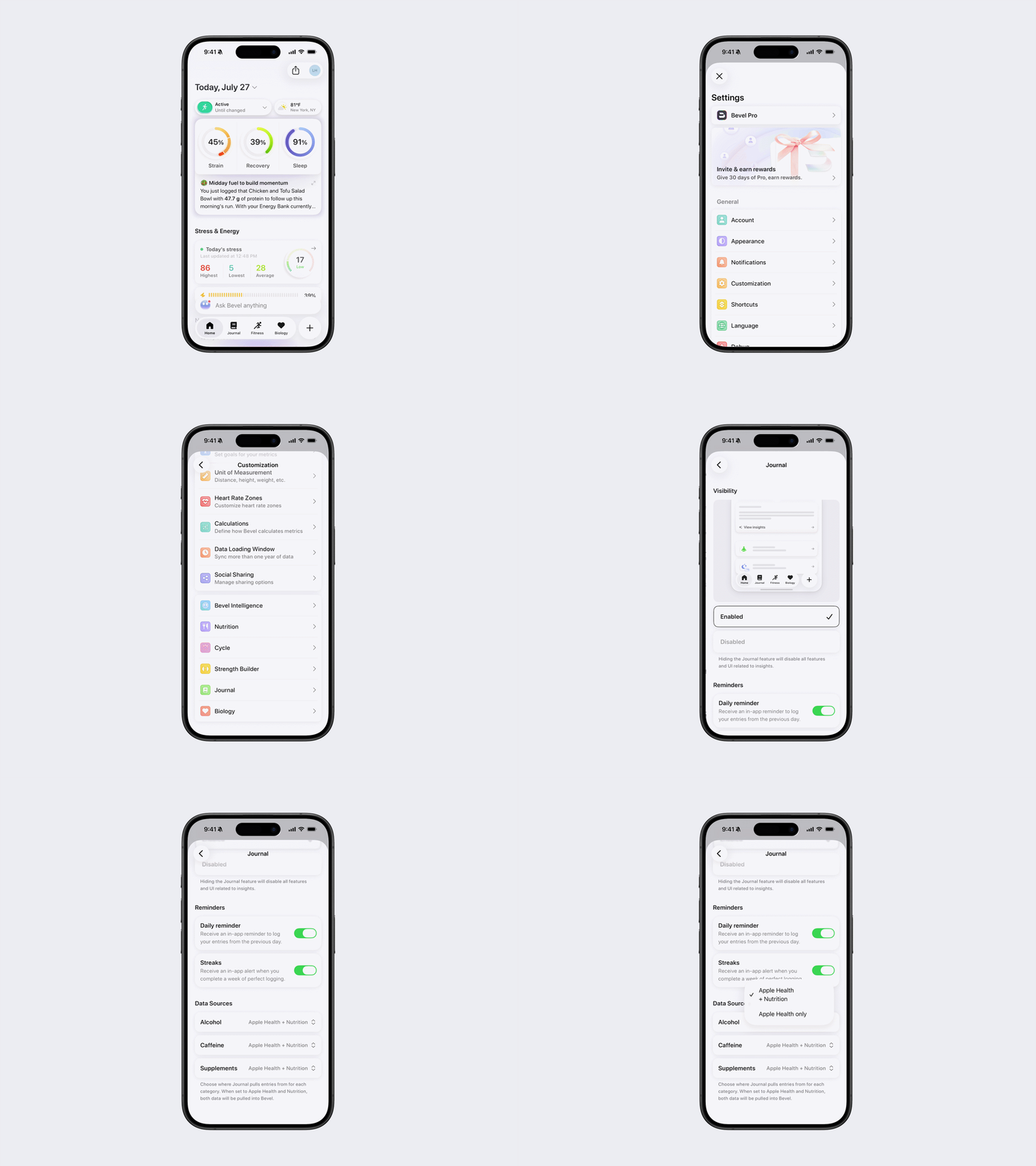
How can I manage data sources for Journal?
To choose which data sources Journal uses:
Open Bevel.
Go to Profile → Customization → Journal.
Select the journal category you want to customize.
Choose which data source(s) Bevel should use for that category.
For supported categories (such as Alcohol, Caffeine, and Supplements), you can choose between:
Apple Health + Nutrition: Imports data from both Apple Health and Nutrition.
Apple Health only: Imports data only from Apple Health.
How can I create a Daily Water Goal?
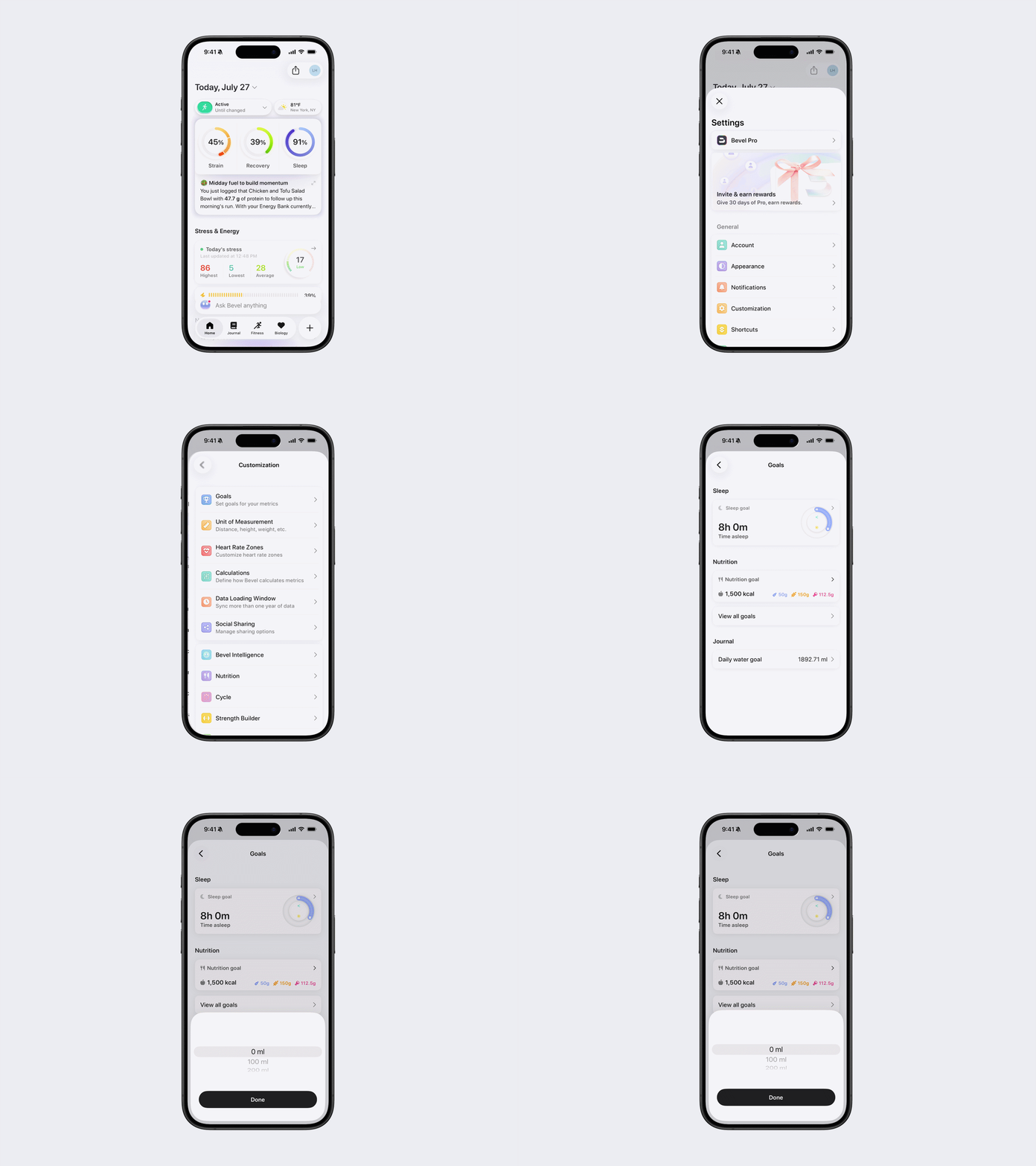
To set a daily water goal:
Open Bevel.
Go to Profile → Customization → Goals.
Tap Daily Water Goal.
Enter your desired daily water intake goal and save your changes.
How can I see previous Journal entries?
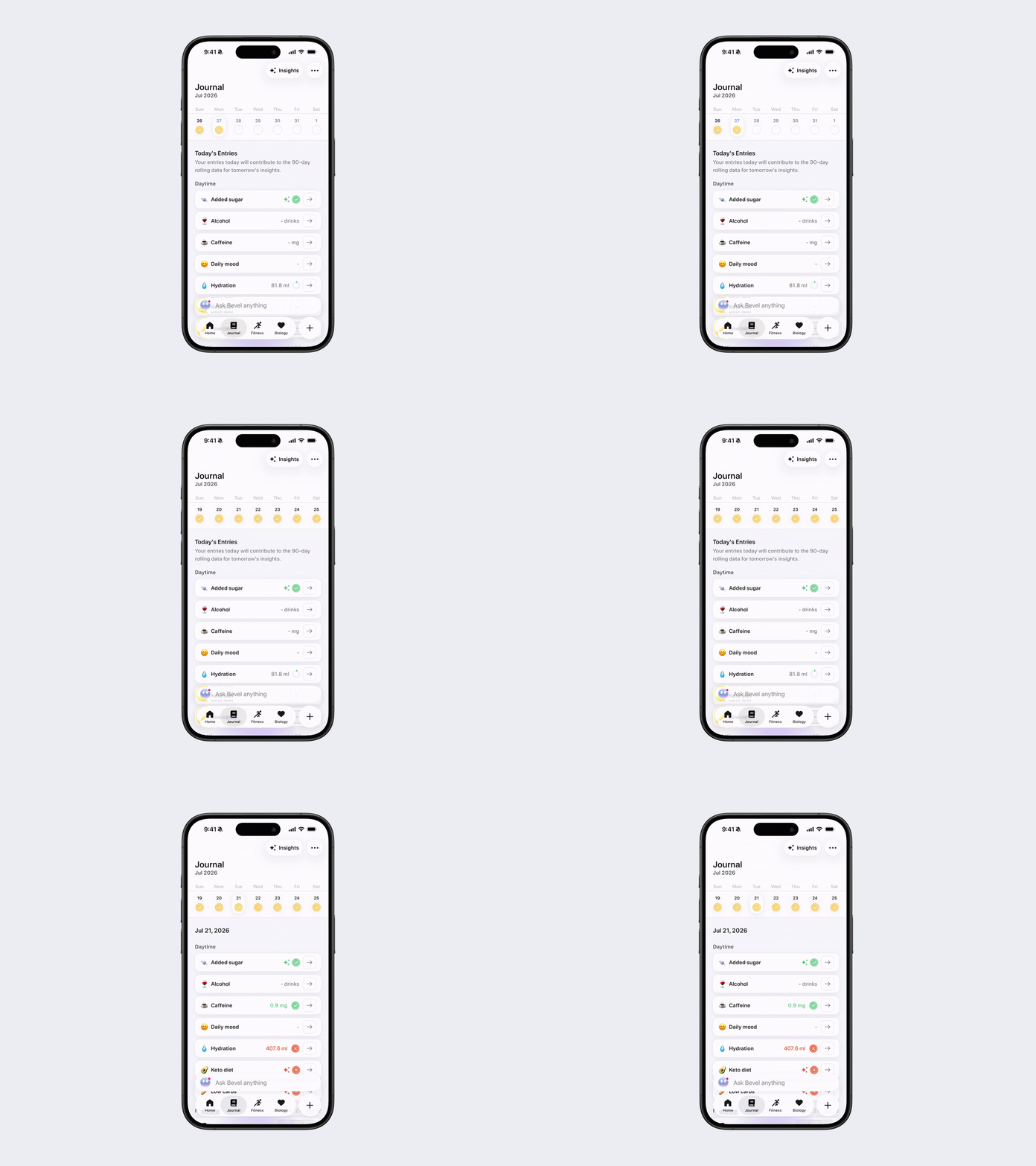
To see Journal entries from a previous day
Open the Journal tab.
Swipe left or right across the date bar at the top to navigate between weeks.
Tap the specific date you want to view.
The Journal will display the entries recorded for that selected day.
What is the morning pop-up I receive? How can I change it?
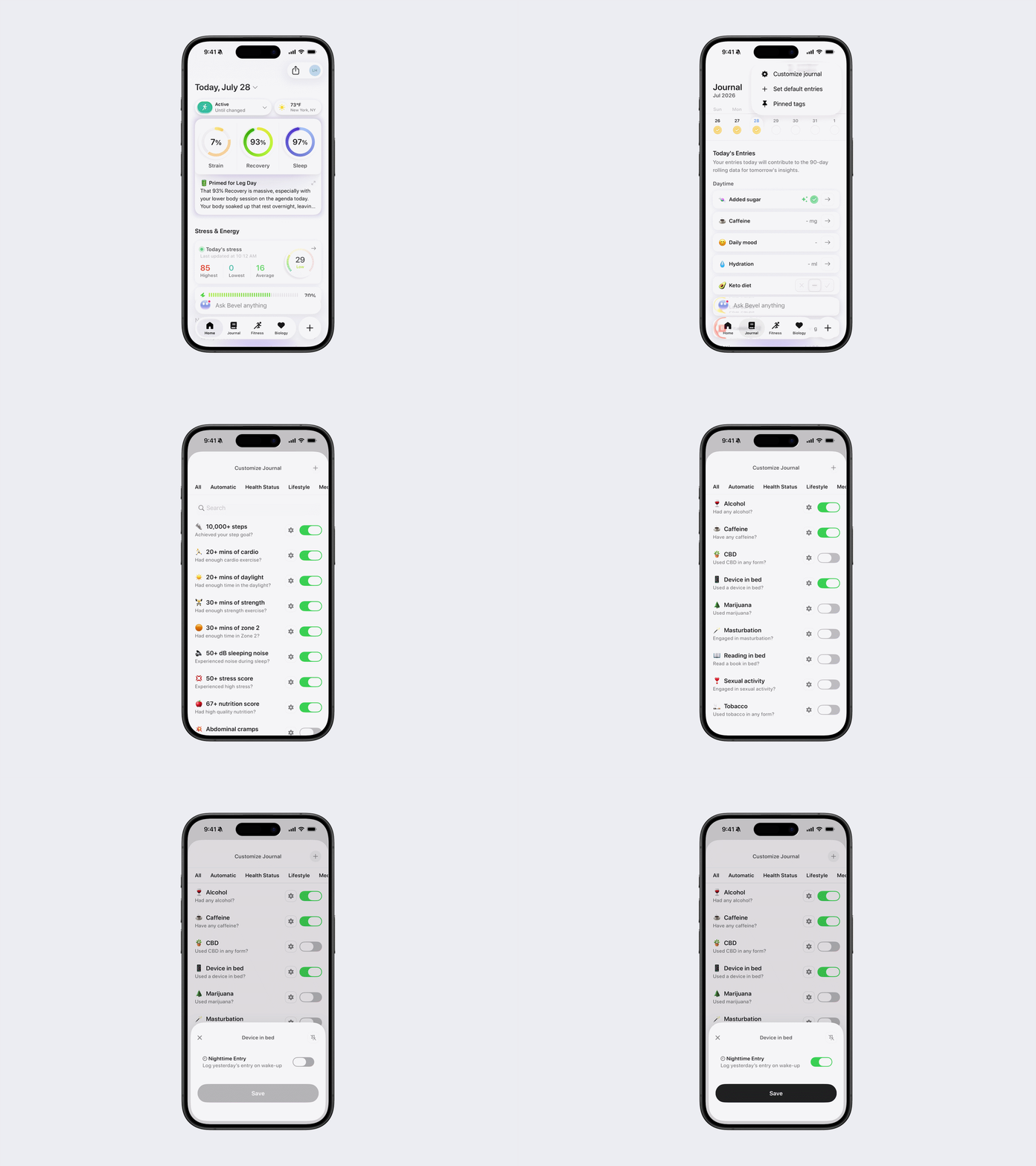
Bevel displays a morning pop-up with Journal entries that are configured for Nighttime Entry ("Log yesterday's entry on wake up"). By default, this includes:
50+ dB Sleeping Noise
Device in Bed
Late Meal
You can customize which Journal entries appear in this morning pop-up by enabling or disabling Nighttime Entry in the settings for each supported Journal entry.
To customize the morning pop-up:
Open the Journal tab.
Tap the three dots in the top-right corner.
Tap Customize Journal.
Tap the Settings icon next to the Journal entry you want to change.
Toggle Nighttime Entry (Log yesterday's entry on wake up) on or off, if available.
Why is the 50+ dB Sleeping Noise entry always blank? What does it mean if I can't select it?
The 50+ dB Sleeping Noise entry is automatically detected and cannot be logged manually.
If you're using an Apple Watch with Noise Notifications enabled in Apple Health, your watch measures ambient background noise while you sleep. Bevel reads this data and automatically logs the entry when applicable.
If the entry is blank or unavailable, it means no qualifying data was recorded or imported for that night.
What is the difference between Morning Sunlight and Morning Sunlight (Auto)?
Morning Sunlight is a manual Journal entry that you can log yourself by toggling it on.
Morning Sunlight (Auto) is automatically detected when Bevel determines that you've been exposed to sunlight after waking up, so no manual entry is required.
Will disabling a Custom Journal Entry delete my previous Journal entries?
No. Disabling a Journal entry only hides it from your active Journal, it does not delete any of your historical data. If you re-enable the entry later, all of your previous Journal entries for that topic will reappear exactly as they were before.
Which Apple Watch models support the Time in Daylight metric?
The Time in Daylight metric is supported on Apple Watch Series 6 and later, Apple Watch SE (2nd generation and later), and all Apple Watch Ultra models. Older models, such as Apple Watch Series 3, do not support this feature.