
How to Track Strength Progression
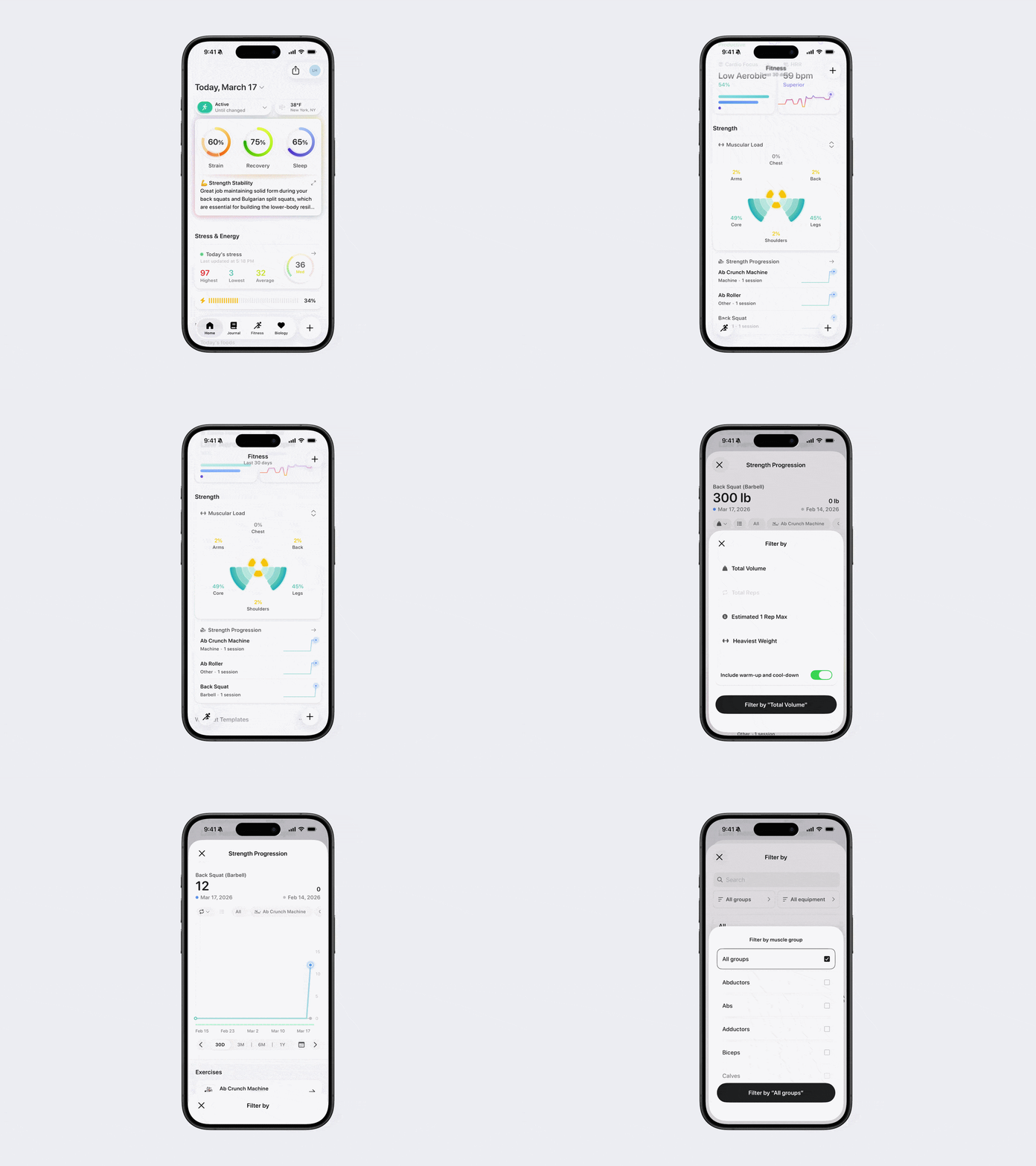
Strength Progression helps you track how your strength improves over time for individual exercises. This makes it easy to see trends, measure progress, and know when to increase weight, reps, or intensity.
How to View Strength Progression
Open Bevel.
Go to the Fitness tab.
Scroll down to Strength Progression.
Tap into the chart to view details.
Use the button on the far left underneath the date to filter by Total Volume, Reps, Estimated 1 Rep Max, or Heaviest Weight.
Use the three-line button next to it to filter by muscle group, equipment, or a specific exercise.
Click the Calendar icon next to the time labels to adjust Chart Settings such as date, lookback period, chart view (line or bar), and display period (day, week, or month).
What Strength Progression Shows
Changes in weight lifted over time
Trends in reps and sets
Progress for each individual exercise
Historical performance to help guide future workouts
Tip: Review Strength Progression regularly to identify plateaus and decide when to progressively overload by increasing weight, reps, or sets.