
How to Purchase Additional Bevel Intelligence Credits
If you reach your weekly Bevel Intelligence credit limit, you can purchase additional credits at any time to continue using Bevel Intelligence features.
Unused purchased credits roll over week to week and never expire.
Purchase Additional Credits
Open Bevel.
Tap your initials or profile picture in the top-right corner.
Tap Customization.
Tap Bevel Intelligence.
Under Usage and Extra Credits, tap Manage Credits.
Under Purchase Additional Credits, choose a credit pack and tap Buy __ Credits.
Follow the checkout steps to complete your purchase.
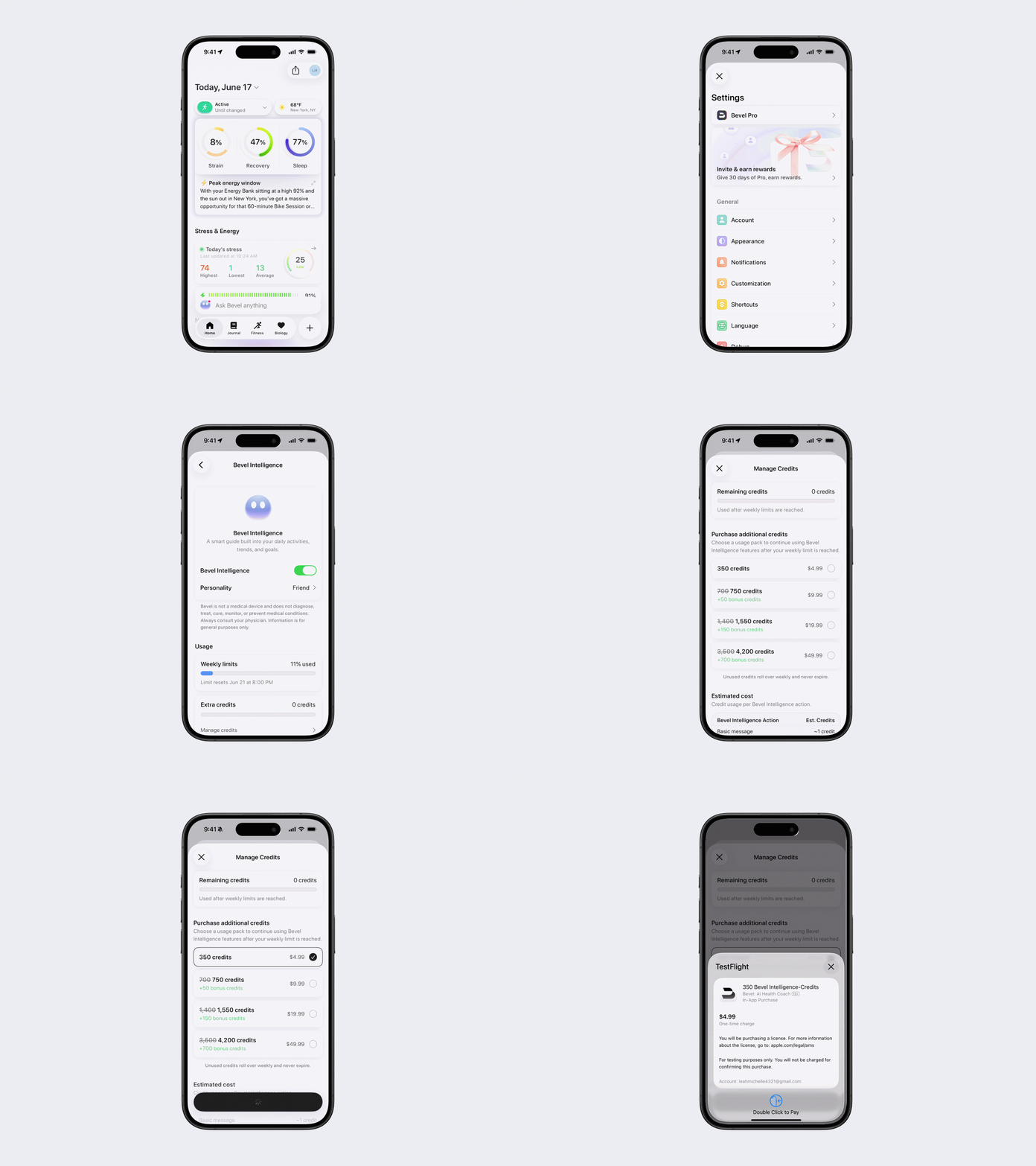
Available Credit Packs
Credits | Bonus Credits | Total Credits |
350 | — | 350 |
700 | 50 | 750 |
1,400 | 150 | 1,550 |
3,500 | 700 | 4,200 |
Credit pack pricing, bonus credits, and available packages are subject to change.
Estimated Credit Usage
The number of credits used depends on the type of Bevel Intelligence action performed.
Estimated Credits per Action on the Standard Model
Bevel Intelligence Action | Estimated Credits |
Basic message | ~1 credit |
Basic check-in (reminder style) | ~3 credits |
Food logging | ~5 credits |
Impact analysis | ~8 credits |
Detailed check-in (data-driven) | ~10 credits |
Training plan reconciliation with detailed report | ~20 credits |
Estimated Credits per Action on the Upgraded Model
Bevel Intelligence Action | Estimated Credits |
Basic message | ~3 credit |
Basic check-in (reminder style) | ~9 credits |
Food logging | ~15 credits |
Impact analysis | ~24 credits |
Detailed check-in (data-driven) | ~30 credits |
Training plan reconciliation with detailed report | ~60 credits |
Credit usage estimates are provided for guidance only and are subject to change. Actual credit consumption may vary based on the complexity of the request and the amount of data processed.
*Note: Standard Bevel features are free to use and do not require credits. This includes Capture Food, Import Food, Describe Food, and generating workout templates. Credits are only used when you access features within Bevel Intelligence (BI), such as BI-powered food logging or workout generation.