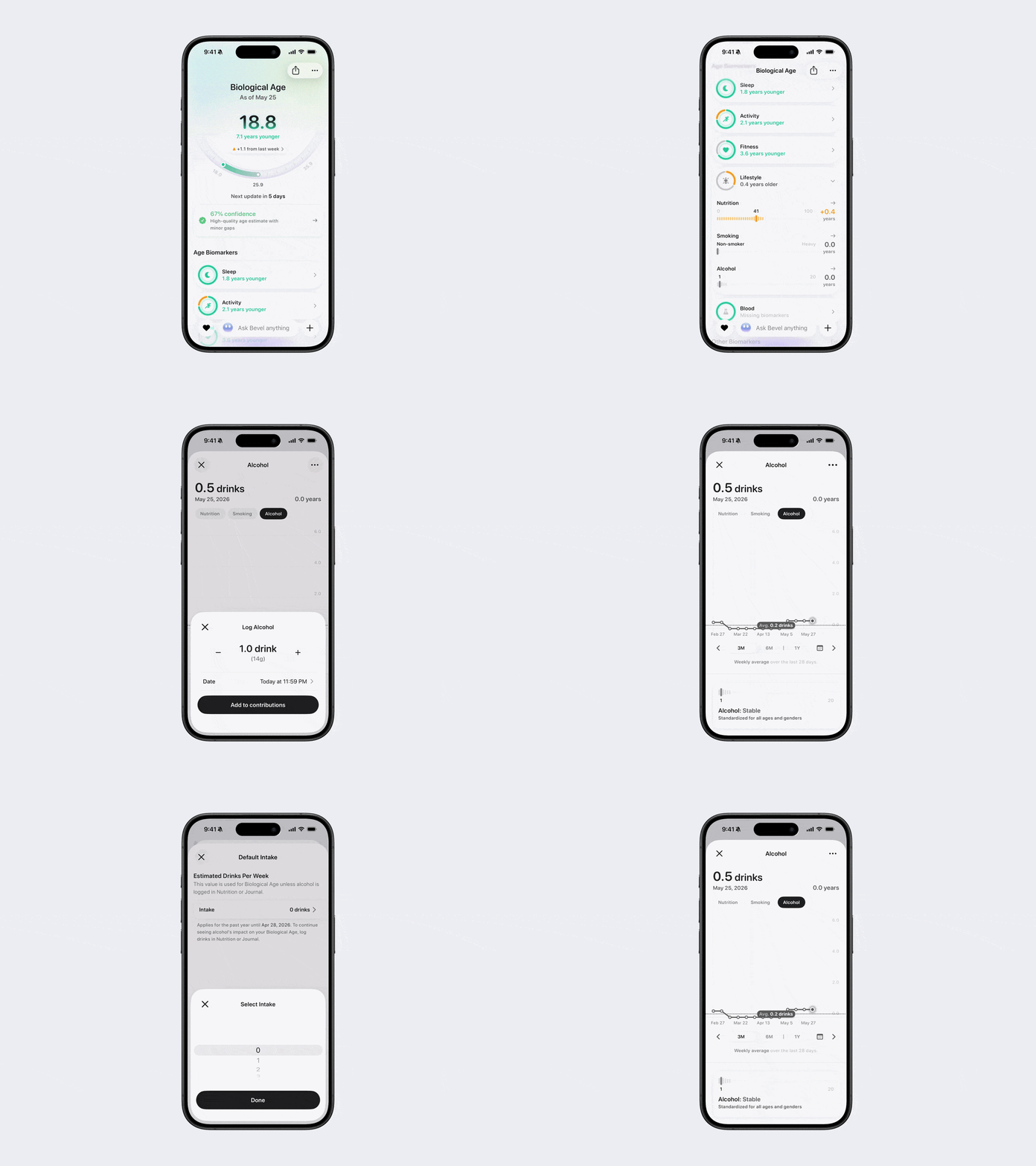
How to Log Alcohol from Biology
Bevel lets you log your alcohol intake so it can be considered when estimating your Biological Age. Alcohol consumption can influence many biological markers related to aging, including sleep, recovery, cardiovascular health, inflammation, and overall wellness.
Logging your alcohol intake helps Bevel better understand lifestyle factors that may impact how your body is aging and ensures your Biological Age insights reflect your current habits.
Note: Alcohol logged in Nutrition or Journal will also appear here.
Add Alcohol Log
Open Bevel.
Tap the Biology tab.
Scroll down to Age Biomarkers.
Tap the Lifestyle section to open it.
Tap Alcohol.
Tap the three dots (…) in the top-right corner.
Tap + Add Alcohol Log.
Add or subtract drinks using the + or – buttons.
To enter an exact amount, tap the number in the middle and type your value.
Tap Add to Contributions to save your log.
Edit Your Default Intake
Open the Alcohol screen.
Tap Edit Default Intake in the top-right corner.
Set your default weekly alcohol intake.
Tap Save.