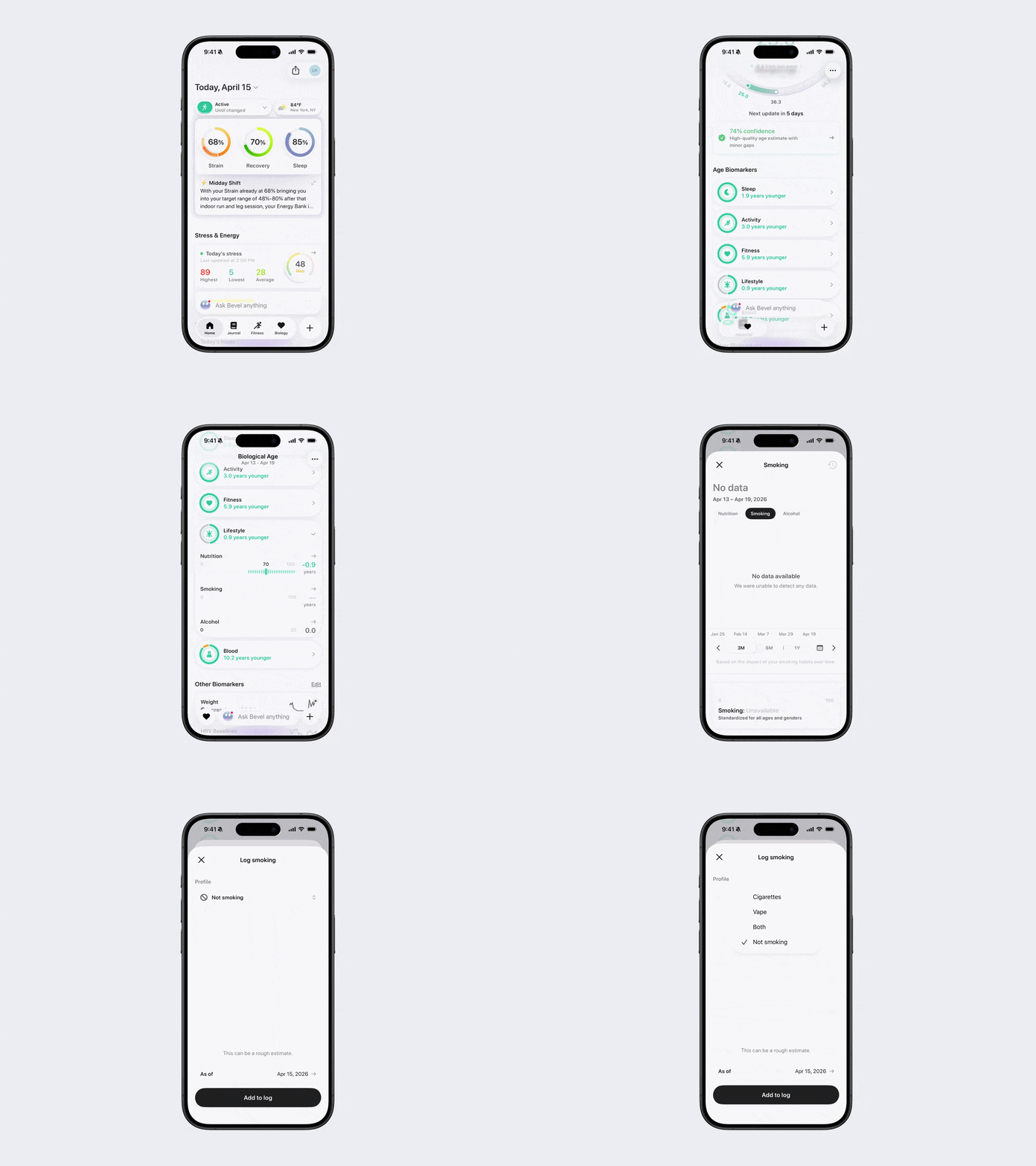
How to Track Smoking Impact
Bevel lets you track your smoking habits so they can be taken into account when estimating your Biological Age. Smoking and nicotine use can influence many biological markers related to aging, including cardiovascular health, lung function, inflammation, and recovery. Logging your smoking helps Bevel better understand lifestyle factors that may impact how your body is aging and ensures your age estimates and biomarker insights reflect your current habits.
You can set your smoking status during onboarding and update it over time to keep your data accurate. This setting is used specifically for Biological Age calculations and is not intended for tracking daily cigarette use. If you want to log tobacco use day to day, you can use Journal, which is separate from this setting.
Add Smoking Impact
Open Bevel.
Tap the Biology tab.
Scroll down to Age Biomarkers.
Tap the Lifestyle section to open it.
Tap Smoking Impact.
Tap the refresh icon in the top-right corner.
Tap the + button in the top-right corner.
Under Profile, choose your status:
I smoke cigarettes
I vape
I do both
Not smoking
Based on your selection, adjust:
Cigarette intake or
Vape intake and nicotine strength
Update the As of date at the bottom.
Tap Add to Log.