
Strength Builder Common Questions
We’ve compiled answers to the most frequently asked questions about Strength Builder.
What is the difference between Strength Builder and Apple’s Strength Training?
Strength Builder (Bevel):
Uses movement, weight, reps, and sets
Provides a more accurate Strain score
Apple Strength Training:
Primarily uses heart rate
Only captures part of your total effort
Do I need the Internet to use Strength Builder?
You can use Strength Builder offline during your workout.
However:
Syncing data between your watch and phone requires iCloud
An internet connection is needed for data to fully sync
Bluetooth must be enabled between your watch and phone
Battery saver mode should be turned off on both devices
Compatibility: Users on older watchOS versions may experience slower performance. Make sure your Bevel app is up to date and running the same version on both your phone and watch.
What is Live Sync?
Live Sync lets you start a workout on your phone or watch and control it from either device.
You can:
Edit weights, reps, and duration
Add sets
Create supersets and circuits
Add warmups, cooldowns, failure sets, and drop sets
Swap exercises during workouts
Change the order of exercises
How do I log Rate of Perceived Exertion (RPE)?
At the end of a Strength Builder workout:
Bevel provides an estimated RPE
You can adjust it manually
How does Bevel know my RPE of a set?
We estimate your Rate of Perceived Exertion (RPE), or how hard you're working, using Velocity-Based Training (VBT) data from your watch's accelerometer. If VBT data isn't available, we use the overall workout RPE instead.
How do I start a workout without a Template?
This isn’t currently supported.
Workaround:
Create an empty Template (e.g. “Mobility” or “Custom Workout”)
Add exercises during the workout
How do duration-based exercises work?
A countdown timer starts when the set begins
Once time ends, it continues counting up
You manually stop the set when finished
How do I log AMRAP, EMOM, or RFT workouts?
These workout types are not currently supported, but may be added in the future.
Can I add custom equipment?
Custom equipment types are not currently available.
How do I enable Live Activities?
Requires iOS 16.1+
Dynamic Island supported on iPhone 14 Pro+
Start a Live Sync workout, then:
Lock your phone
Tap Allow when prompted
How can I track strength training with Bevel and Garmin without creating duplicate workouts?
If you’re using a Garmin watch with Bevel, the best way to avoid duplicate Activities is to track your workout directly in Bevel and let Heart Rate data sync afterward.
Here’s how to set it up:
Make sure Garmin Connect is syncing Heart Rate data to Apple Health
Ensure Apple Health is enabled as a Heart Rate data source in Bevel
Start and track your workout in Bevel using Strength Builder (sets, reps, etc.)
Do not start a workout on your Garmin watch, just wear it during the session
Finish the workout in Bevel
Once your watch syncs with Apple Health and Bevel, your heart rate data will automatically be added to the workout.
Note: You won’t see live heart rate data in the Strength Builder view during the workout, but it will appear afterward once everything syncs.
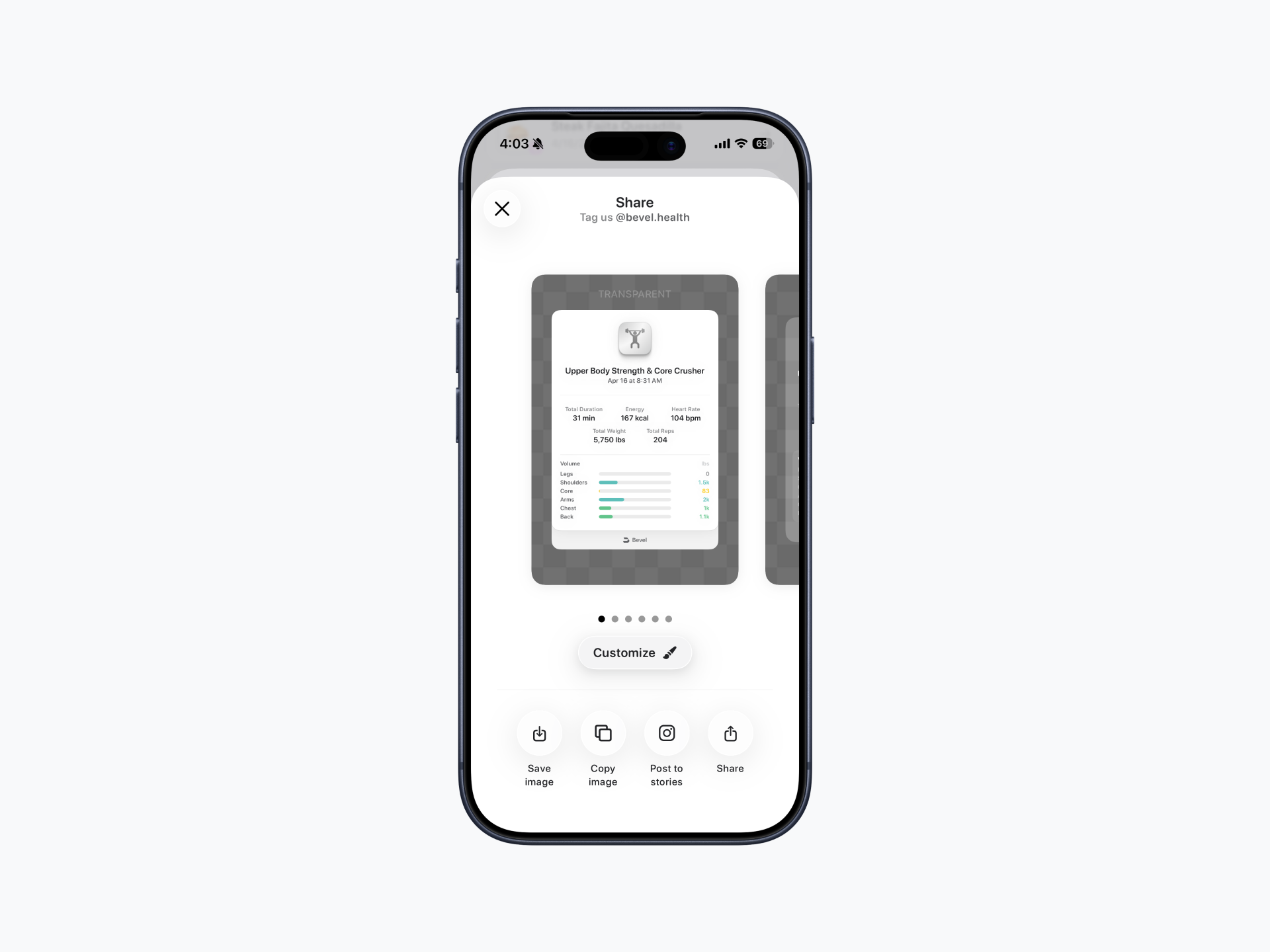
What does the Social Sharing card for Strength Builder show?
After completing a workout, you can share it by tapping the share button in the top-right corner.
The Social Sharing card displays weight lifted per muscle group. This only includes added weight and does not account for bodyweight exercises. If you perform exercises like pull-ups without added weight, the sharing card may appear empty since no external weight is recorded.
Keep in mind that weight is distributed across multiple muscle groups. A primary muscle does not receive 100% of the weight. For example, 1096 kg from a lying press is not attributed entirely to the chest, but spread across the relevant muscles involved.
Can I Use AirPods with Strength Builder?
Yes. You can use AirPods (3rd generation and newer) with Strength Builder, as long as your iPhone is running iOS 26.
No additional setup is required. Once your AirPods are connected to your iPhone, they can be used with Strength Builder on supported devices running iOS 26.
Can I add notes or pain information to a Strength Builder workout?
No. Strength Builder does not currently support adding notes or pain information to individual workouts.
If you'd like to track pain, discomfort, or other observations alongside your workouts, you can create a custom Journal entry and log the information there.
Why doesn't my exercise have an instructional video?
Instructional videos are only available for exercises in the Bevel exercise database. Custom exercises do not include demonstration videos.
Why did my external heart rate sensor connect but I don't see a heart rate?
Most heart rate sensors only transmit data while they detect skin contact.
Make sure the sensor is being worn correctly.
Chest straps may work better if the electrodes are slightly damp.
Heart rate will begin appearing automatically once the sensor detects contact.
Why doesn’t my external heart rate sensor appear in the list?
Check the following:
Bluetooth is enabled.
The sensor is turned on and broadcasting heart rate.
The sensor is not already connected to another device.
If your device requires heart rate broadcasting to be enabled in its companion app, make sure it is turned on.
If available, tap the ? button in the Live Data Source screen for device-specific setup instructions.
Why is my Fitbit Air not appearing as an external heart rate sensor?
Fitbit Air requires heart rate sharing to be enabled.
Open the Google Health app.
Tap the device button in the top-left corner.
Select Fitbit Air.
Tap Share Heart Rate.
Enable Always Visible.
Why did I receive a Health permission message?
Bevel must have permission to write Heart Rate data to Apple Health.
Go to: Settings → Privacy & Security → Health → Bevel → Heart Rate
Enable the permission, then reopen Live Data Source and reconnect your sensor.
Can I use an external sensor with an Apple Watch workout?
No. External Bluetooth sensors are only available for iPhone strength workouts. During iPhone + Apple Watch workouts, the Apple Watch is always used as the heart rate source.
Can I use an external sensor for running or other cardio workouts?
Not currently. External Bluetooth heart rate sensors are supported only for Strength Workouts running on iPhone.