
Understanding Energy Bank (Calendar View)
Edited
Energy Bank: Calendar View
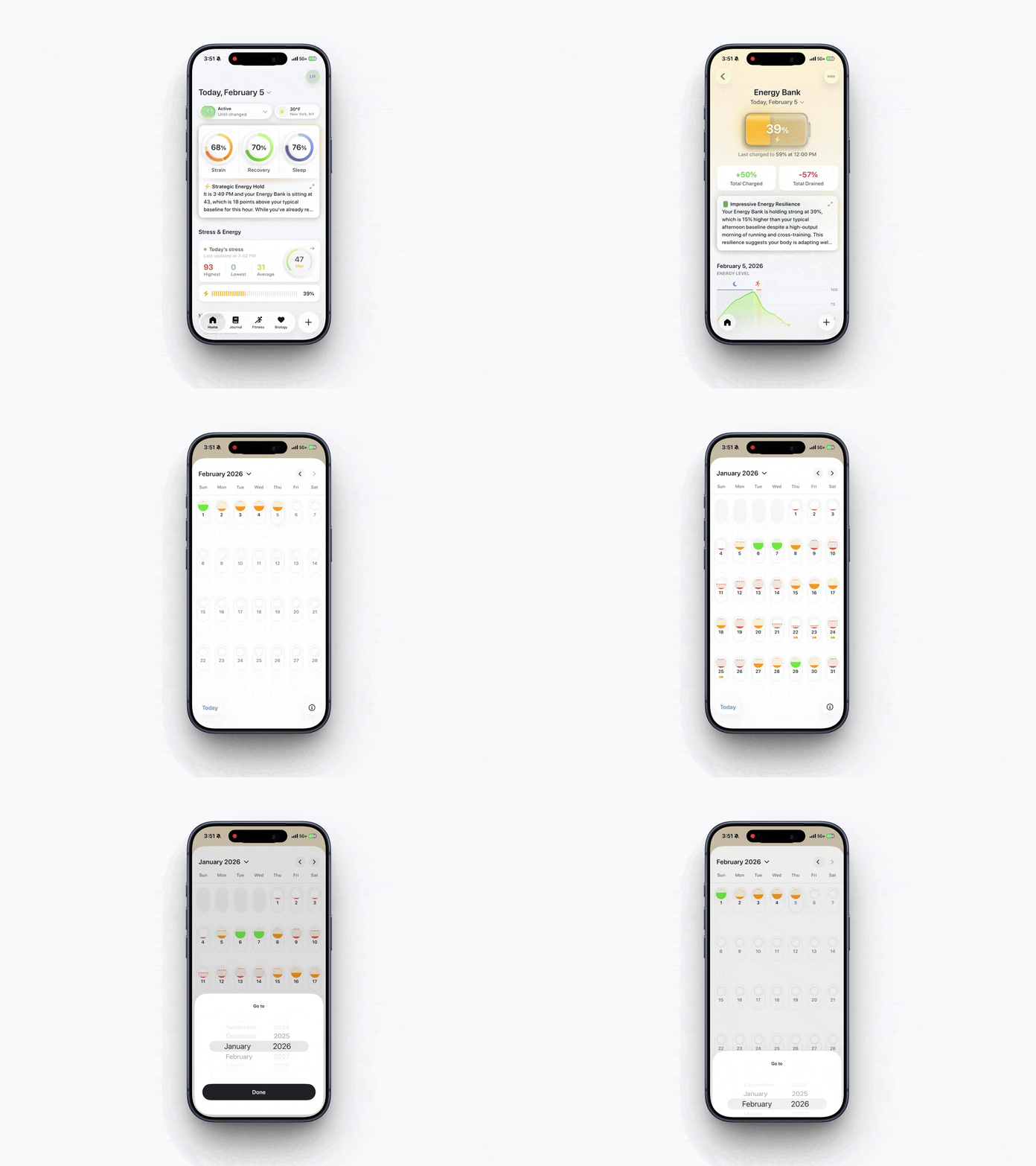
In Bevel, you can view your Energy Bank day by day using the monthly calendar view. This allows you to track how your energy levels change over time and compare patterns across different days and months.
How to Open Energy Bank Calendar View
Open Bevel.
Tap Energy Bank (below Stress, with a lightning bolt and energy percentage).
Tap the down arrow next to today’s date.
Scroll through the calendar to view your daily Energy Bank values for each month.
Understanding the Energy Bank Lines
Dashed line: Represents the day’s peak (maximum) energy level.
Solid line: Represents the latest energy reading for the day (end of day for past days, or current/latest for today).
This view helps you quickly understand your daily Energy Bank range and how it trends over time.
Was this article helpful?
Sorry about that! Care to tell us more?