
How to Edit the Action Button
The Action Button is a quick and easy way to customize and access the items you use most. It’s the “+” button located on the bottom-right of the screen.
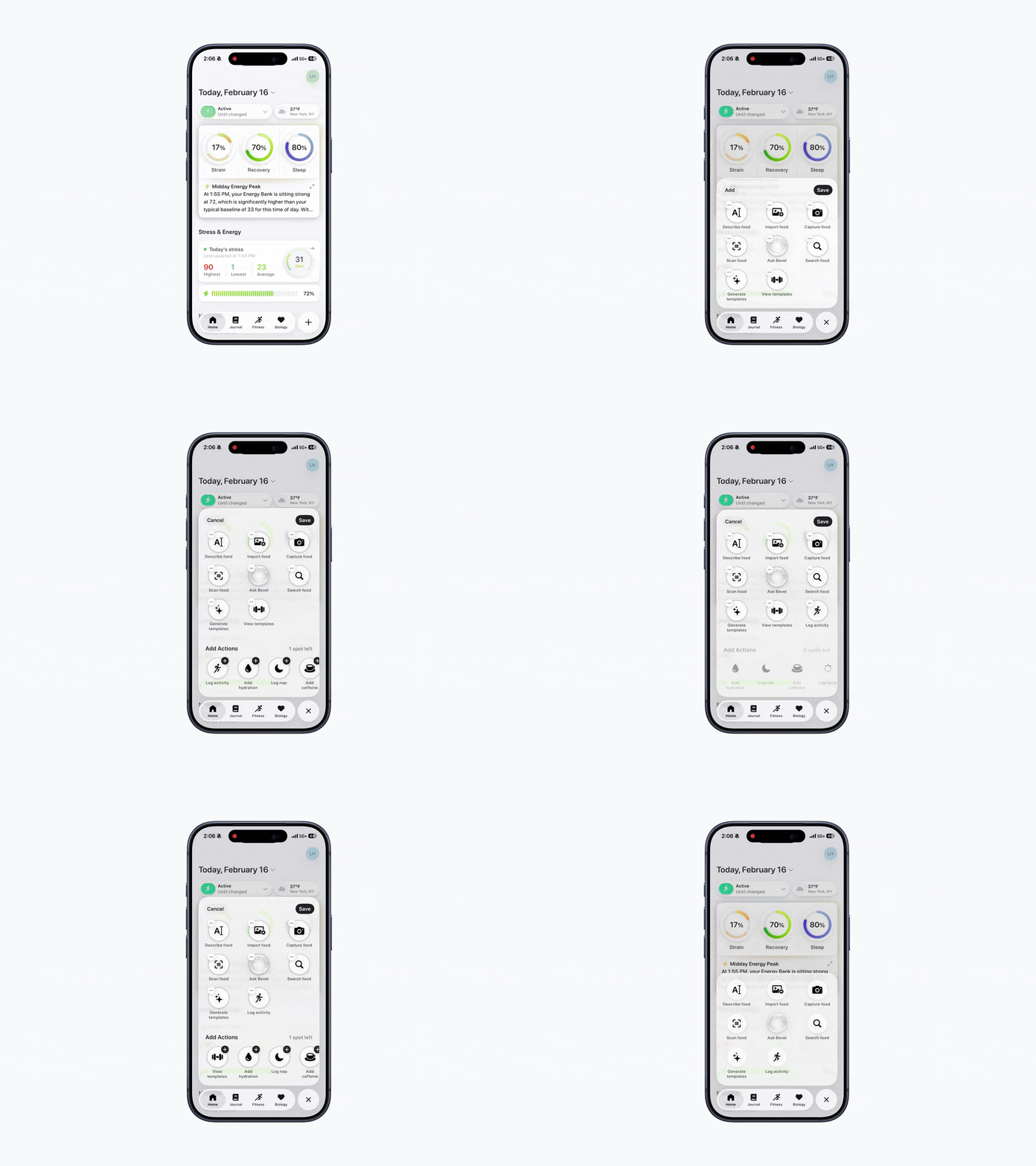
Edit the Action Button
Open Bevel.
Tap the + button in the bottom-right corner.
Press and hold on any icon to enter edit mode.
Tap Add in the top left to choose and add a new action.
Tap the - button on any existing action to remove it.
Tap Save to confirm your changes.
Action Button Options
Log Food: A quick way to track meals. Choose from:
Scan Food: Barcode scan
Capture Food: Take a photo
Describe Food: Describe what you ate
Search Food: Manual database search
Import Food: From your photo library
Log Activity: To manually log a workout or other movement
View Templates: Open your saved workout templates and start one instantly
Generating Templates: Build a new workout template
Ask Bevel: Ask Bevel Intelligence a question
Add Hydration: Log your water intake
Log Nap: Record a nap
Add Caffeine: Track caffeine intake
Log Cycle: Track your period and symptoms